The internet in 2026 is crowded with software promises, subscription traps, and “free trial” gimmicks that quietly turn into monthly bills. Yet a genuine wave of high-quality, zero-cost platforms has emerged that actually delivers professional-grade results without asking for a credit card. This guide breaks down the top 10 free online tools 2026 has to offer, covering everything from AI writing assistants to full design suites, so you can build, market, and manage your work without spending a single dollar.
Whether you are a solo entrepreneur, a freelance developer, a content creator, or someone managing a small team remotely, this list of best free web utilities 2026 has been curated with practicality in mind. Every entry has been chosen because it solves a real problem, works reliably, and does not force you into a paywall the moment you need a core feature. Along the way, you will find comparison tables, honest pros and cons, and direct links so you can start using each tool right away.
Why Free Online Tools Matter More Than Ever in 2026
Budgets are tighter, teams are smaller, and remote work has become the default rather than the exception. Against that backdrop, free web-based utilities for marketers, developers, and creators are no longer a nice bonus — they are a competitive necessity. A freelancer competing against agencies needs the same caliber of design, SEO, and automation tools that larger companies use, and paying for a dozen separate subscriptions is simply not realistic for most independent professionals.
Another shift worth noting is the rise of free AI tools without signup 2026 requirements. A few years ago, almost every AI-powered platform demanded an account, an email verification, and often a phone number before you could test a single feature. That friction has eased considerably. Many of today’s best tools let you try the core functionality instantly, only asking for registration once you want to save your work or unlock advanced settings. This shift toward frictionless access has made experimentation cheaper and faster for everyone.
Small businesses in particular have benefited from this trend. Free web tools for small business owners now cover accounting basics, customer relationship tracking, social scheduling, and even basic video production, allowing a two-person startup to look and operate like a fully staffed company. The tools featured in this article were selected specifically because they hold up under real business use, not just casual personal projects.
How This List Was Curated
Selecting the must have free online tools 2026 offers required more than just popularity metrics. Each platform on this list was evaluated against four criteria: genuine free-tier usefulness (not a crippled demo), reliability and uptime, ease of use for non-technical people, and relevance to current 2026 workflows such as remote collaboration, AI-assisted content, and mobile-first design. Tools that looked promising but buried their best features behind expensive plans were excluded, no matter how well-known the brand.
The result is a mix of established platforms that have matured into excellent free offerings, alongside a few hidden gem free online tools that deserve far more attention than they currently receive. Together, they represent one of the strongest collections of top free web applications 2026 has produced so far.
1. EasyPro Tools
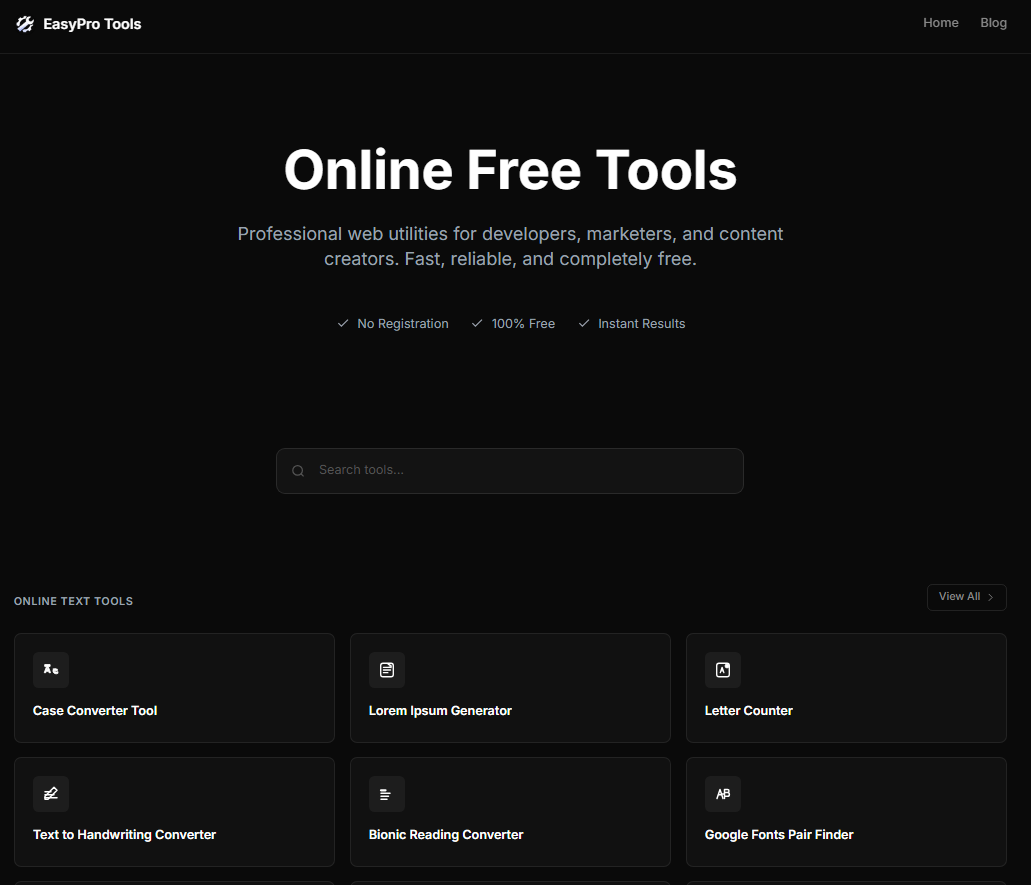
EasyPro Tools sits at the top of this list for good reason. It is a professional web utility hub offering thousands of free tools built specifically for developers, marketers, and content creators, all accessible without the clutter and paywalls that plague so many similar sites. Rather than forcing you to bounce between a dozen different websites for a PDF converter, a word counter, an image compressor, and a code formatter, EasyPro Tools consolidates everything into one fast, reliable platform.
What makes this platform stand out among free utility websites 2026 is the sheer breadth of coverage combined with genuine speed. Many multi-tool sites load slowly, throw ads in your face, or hide the actual utility behind three or four clicks. EasyPro Tools avoids these frustrations with a clean interface that gets you to the tool you need almost instantly. For developers, there are formatters, converters, and validators. For marketers, there are SEO helpers and text analyzers. For content creators, there are image and document utilities that handle everyday production tasks without fuss.
The practical value here cannot be overstated. Instead of bookmarking ten separate single-purpose websites, you can rely on one destination that is updated regularly and covers nearly every common digital task. This is precisely the kind of consolidation that busy professionals need in 2026, when time saved on repetitive small tasks translates directly into more time for meaningful work. For anyone building a toolkit of free coding tools online 2026, or simply looking for a dependable home base of utilities, EasyPro Tools is the logical starting point before exploring anything else on this list.
2. ChatGPT (Free Tier)
ChatGPT remains one of the best free AI writing assistants available, and its free tier in 2026 still covers an impressive range of use cases. From drafting emails and blog outlines to explaining complex topics in plain language, it functions as a genuine thinking partner rather than a gimmick. Writers, marketers, and students alike use it daily to speed up first drafts, brainstorm ideas, and get unstuck when facing a blank page.
For anyone searching for free online tools for writers 2026, ChatGPT’s conversational interface is a major advantage over older, form-based writing tools. You describe what you want in natural language, and the tool adapts to follow-up instructions, tone adjustments, and format changes on the fly. This flexibility makes it useful far beyond writing alone; developers use it to debug code snippets, marketers use it to generate ad copy variations, and small business owners use it to draft policy documents or customer responses.
It is worth noting that the free tier does have usage limits and occasional slower response times during peak hours, which is the trade-off for not paying a subscription. Even with those constraints, it remains one of the most versatile entries among free ai tools without signup 2026, since basic use requires no payment information and only a simple account to begin.
3. Canva
Canva has become the default answer whenever someone asks about free online tools for web design or general graphic creation. Its drag-and-drop editor, enormous template library, and stock photo integration allow anyone, regardless of design background, to produce professional-looking graphics for social media, presentations, and marketing materials in minutes rather than hours.
The free plan is genuinely generous compared to many competitors. Users get access to thousands of templates, a solid selection of fonts and elements, and enough export options to cover most everyday needs. This makes it one of the best free content creation tools 2026 for small teams that cannot justify hiring a dedicated designer for every social post or flyer. Marketing teams especially benefit from the brand kit feature, which keeps colors and fonts consistent across a business’s visual identity even when multiple people are creating content.
Where Canva shows its limits is in advanced design work requiring precise control over vector paths or complex layering, tasks better suited to specialized software. For everyday content production, however, it remains unmatched in accessibility and speed, and it continues to top nearly every list of top free design tools online 2026 for good reason.
4. Grammarly
Grammarly has evolved from a simple spell-checker into a comprehensive writing assistant that catches grammar mistakes, awkward phrasing, tone inconsistencies, and clarity issues across browsers, documents, and email clients. The free version integrates directly into Chrome, Word, and most web-based text fields, quietly correcting errors as you type without interrupting your workflow.
For content creators and marketers producing large volumes of text, this tool functions as a safety net that catches embarrassing typos before they reach a client or a published article. It is particularly valuable for non-native English speakers who want to sound polished and professional without hiring a separate editor for every piece of writing. Combined with a tool like ChatGPT for drafting, Grammarly for polishing creates a workflow that rivals what a small editorial team could produce a decade ago.
The premium tiers unlock deeper style suggestions and plagiarism detection, but the free version alone covers the vast majority of everyday writing needs, making it a staple among free online tools for writers 2026 and a natural companion tool for anyone producing regular blog content, emails, or reports.
5. TinyPNG
Image weight is one of the most overlooked factors in website performance, and TinyPNG solves that problem elegantly. This free image editor online no signup service compresses PNG and JPEG files dramatically while preserving visual quality, which directly improves page load speed and search engine rankings. Site owners who ignore image optimization often wonder why their beautifully designed pages still load slowly, and oversized images are frequently the hidden culprit.
The tool works through a simple drag-and-drop interface with no account required for basic use, making it one of the most frictionless entries among free ai tools without signup 2026. Developers building websites can batch-compress dozens of images before deployment, while bloggers and marketers can shrink featured images before uploading them to a content management system. The compression algorithm strikes a careful balance, reducing file size by sixty to seventy percent in many cases without introducing noticeable artifacts.
Because page speed has become a significant ranking factor for search engines, tools like this belong in the toolkit of anyone serious about best free online seo tools 2026. A faster-loading site keeps visitors engaged longer, reduces bounce rates, and signals quality to search algorithms, all from a task that takes less than thirty seconds per image.
6. Trello
Task and project management can spiral out of control quickly once a team grows past two or three people, and Trello addresses this with a visual, card-based system that is intuitive from the first login. Its free plan supports unlimited personal boards, decent card limits per workspace, and integrations with popular apps, making it one of the strongest top free task management tools 2026 has to offer for small teams and solo professionals alike.
The board-and-card metaphor mirrors how people naturally think about workflow stages, moving tasks from “to do” through “in progress” to “done.” This simplicity is precisely why it remains popular even as more complex project management platforms have entered the market. Remote teams benefit enormously from this visual clarity, since it replaces long email threads and scattered spreadsheets with a single shared source of truth that anyone can check at a glance.
For freelancers managing multiple clients, Trello also functions well as a lightweight CRM alternative, tracking project status, deadlines, and notes in one place. It sits comfortably among the best free utilities for remote work, especially for teams that need structure without the steep learning curve of enterprise software.
7. Google Search Console
Search engine visibility can feel like guesswork without proper data, and Google Search Console removes much of that uncertainty at zero cost. This platform shows exactly how a website performs in search results, which queries drive traffic, which pages have indexing issues, and which technical problems might be hurting rankings. For anyone serious about organic growth, it is arguably the single most important entry among best free online seo tools 2026.
Unlike many third-party SEO platforms that limit their free tiers to a handful of reports, Search Console provides direct data from Google itself, meaning the insights are accurate and unfiltered by a third party’s estimation models. Site owners can submit sitemaps, request re-indexing after content updates, and monitor mobile usability issues that might otherwise go unnoticed for months. Marketers running content strategies rely on this data to identify which topics are gaining traction and which pages need better optimization.
Combined with the compression benefits from TinyPNG and thoughtful keyword placement, Search Console rounds out a free SEO workflow that costs nothing but delivers insights normally reserved for paid analytics suites. It is a non-negotiable addition to any list of top free browser tools 2026 for site owners who want to understand their audience rather than guess at it.
8. CapCut
Video content has become the dominant format across nearly every platform, and CapCut has positioned itself as one of the most capable free video editing tools available to casual creators and small businesses alike. Originally popular among short-form video creators, it has expanded into a fully capable editor with transitions, text overlays, auto-captioning, and a template library that speeds up production significantly.
The free tier covers export in high resolution, a wide library of effects, and cross-platform syncing between mobile and desktop, which is unusual generosity compared to older desktop editing software that historically gated even basic export quality behind paid licenses. For small businesses producing product demos or social media clips, this removes one of the biggest cost barriers to consistent video marketing.
Auto-captioning deserves particular mention, since accessibility and silent-autoplay viewing habits have made captions nearly mandatory for social video. CapCut generates reasonably accurate captions automatically, saving creators the tedious work of manual transcription. This single feature alone places it firmly among the best free tech tools 2026 for anyone building a video-first content strategy.
9. Notion
Organizing notes, documents, and project plans across multiple tools creates fragmentation that slows teams down, and Notion solves this by combining notes, databases, wikis, and task tracking into one flexible workspace. Its free plan is generous enough for individuals and small teams, offering unlimited pages and blocks along with basic collaboration features that rival paid alternatives from a few years ago.
What sets Notion apart among best free productivity tools 2026 is its adaptability. A single workspace can function as a personal journal, a company wiki, a content calendar, or a lightweight database, depending entirely on how the user structures it. This flexibility appeals strongly to remote teams and freelancers who need one central hub rather than juggling separate apps for notes, tasks, and documentation.
The learning curve is slightly steeper than more rigid tools like Trello, since Notion’s power comes from its openness rather than pre-built structure. Once a workflow is set up, however, it becomes remarkably efficient, and templates shared by the Notion community mean most users never need to build a system entirely from scratch. It remains one of the more versatile entries among free online time management tools currently available.
10. Zapier (Free Tier)
Manual, repetitive tasks quietly drain hours from every workweek, and Zapier addresses this through no-code automation that connects different apps together. Its free plan allows a limited number of automated workflows, called Zaps, which can trigger actions across email, spreadsheets, social media, and hundreds of other supported apps without writing a single line of code.
For small business owners and marketers, this represents one of the best free automation tools 2026 has produced, since it eliminates the need for a developer to build custom integrations for simple tasks like saving email attachments to cloud storage or posting new blog content automatically to social channels. The visual workflow builder makes cause-and-effect logic easy to understand even for people with no technical background, positioning it firmly among best free no-code tools 2026.
The free tier does limit the number of active automations and how frequently they run, which becomes a real constraint for larger operations. For anyone just starting to explore free online tools for workflow automation, though, the free plan is more than sufficient to prove the concept and save real time before ever considering an upgrade.
Quick Comparison: All 10 Tools at a Glance
| Tool | Best For | Category | Signup Required | Standout Feature |
|---|---|---|---|---|
| EasyPro Tools | All-in-one utilities | Developers, marketers, creators | No (for most tools) | Thousands of free tools in one hub |
| ChatGPT | Writing and brainstorming | AI assistant | Yes | Natural language conversation |
| Canva | Graphic design | Design | Yes | Massive template library |
| Grammarly | Writing correction | Writing assistant | Yes | Real-time grammar and clarity checks |
| TinyPNG | Image compression | Web performance | No | Fast lossy compression |
| Trello | Task management | Productivity | Yes | Visual card-based boards |
| Google Search Console | SEO monitoring | SEO | Yes (Google account) | Direct search performance data |
| CapCut | Video editing | Content creation | Optional | Auto-captioning |
| Notion | Notes and organization | Productivity | Yes | Flexible all-in-one workspace |
| Zapier | Workflow automation | Automation | Yes | No-code app integrations |
Pros and Cons of Relying on Free Tools
| Aspect | Advantage | Limitation |
|---|---|---|
| Cost | No upfront investment required | Advanced features often locked behind paid tiers |
| Accessibility | Available instantly from any browser | Some tools require account creation |
| Scalability | Great for solo users and small teams | Usage caps can restrict larger operations |
| Learning curve | Most tools are beginner-friendly | Flexible tools like Notion need setup time |
| Reliability | Backed by established companies | Occasional downtime or slower support response |
How to Choose the Right Free Tool for Your Needs
Picking from this many strong options can feel overwhelming, so it helps to start with the specific problem you are trying to solve rather than the tool’s popularity. A developer hunting for free coding tools online 2026 should prioritize speed and format support over flashy design, while a marketer focused on content output should weigh writing and design tools more heavily than automation platforms.
It also pays to think about how these tools work together rather than in isolation. A content creator might draft an article outline in ChatGPT, polish the wording in Grammarly, design a featured graphic in Canva, compress it with TinyPNG, and finally track performance through Google Search Console. None of these steps requires payment, yet the combined workflow rivals what a small paid software stack would offer just a few years ago.
Another practical consideration is data portability. Before committing fully to any platform, check whether you can export your work easily if you ever decide to switch. Tools like Notion and Trello generally offer straightforward export options, which protects you from vendor lock-in even on a free plan. This due diligence matters more as your reliance on these platforms grows over time.
Tips for Getting the Most Out of Free Online Tools
Treating free tools with the same discipline you would apply to paid software tends to produce better results. Setting up folder structures in Canva, creating reusable templates in Notion, or saving custom snippets in EasyPro Tools all compound in value the longer you use them consistently. Many users abandon a tool after a single session simply because they never took the time to configure it properly for repeated use.
Staying aware of usage limits also prevents frustration. Free tiers on platforms like Zapier or ChatGPT reset on specific cycles, and understanding those limits in advance helps you plan heavier workloads around available capacity rather than hitting a wall mid-task. Bookmarking a handful of top free browser tools 2026 as browser extensions, where available, can also shave meaningful time off daily routines by keeping frequently used utilities one click away.
Finally, it is worth revisiting this space every few months. The market for trending free online software 2026 moves quickly, and platforms regularly expand or shrink their free offerings in response to competition. What was a paid feature six months ago might now be free, and staying current ensures you are never paying for something a free alternative already handles well.
The Growing Role of Browser Extensions and Lightweight Utilities
Beyond full platforms, a quieter category of tools has grown significantly: lightweight browser extensions that solve one specific problem exceptionally well. Grammarly’s browser extension is a prime example, but the broader category of top free browser extensions 2026 includes ad blockers, password managers, and tab organizers that collectively make daily browsing faster and safer without ever opening a separate application.
These small utilities matter because they reduce friction at the exact moment a task needs to happen, rather than requiring you to switch context to another website entirely. For developers, browser-based inspection tools and free full stack developer tools online have similarly matured, offering console debugging, network analysis, and responsive design testing directly inside the browser without installing heavy desktop software.
Conclusion
The free software landscape in 2026 has matured into something genuinely useful rather than a collection of watered-down demos. From EasyPro Tools sitting at the center as a comprehensive utility hub, to specialized platforms like Canva, Grammarly, and Zapier handling specific professional needs, the tools covered in this article prove that quality work no longer requires a large budget. Building a personal stack from this list, starting with EasyPro Tools and layering in whichever specialized platforms match your daily work, gives you a foundation that competes with far more expensive setups.
The businesses and creators who thrive going forward will be the ones who use these resources deliberately rather than randomly, combining a handful of dependable tools into a consistent workflow. Bookmark the ones that fit your needs, experiment with the rest, and revisit this space periodically since the best free online tools of tomorrow are already being built today.
Frequently Asked Questions
Are these free tools genuinely free, or do they require payment eventually?
Every tool listed here offers a real, usable free tier rather than a short trial. Some, like EasyPro Tools and TinyPNG, require no signup at all for core features, while others like Canva or Notion ask for a free account but do not demand payment information. Paid upgrades exist for advanced features, but the free versions remain fully functional for everyday use.
Which tool should a beginner start with?
EasyPro Tools is the most practical starting point since it consolidates thousands of everyday utilities in one place without a learning curve. From there, adding Canva for design and ChatGPT for writing covers the majority of tasks most beginners need to handle.
Can small businesses realistically run on free tools alone?
Many small businesses operate almost entirely on free software during their early stages, combining tools like Trello for tasks, Canva for marketing visuals, and Google Search Console for SEO tracking. Limitations appear as teams grow larger, but for solo founders and small teams, free tiers often cover the essentials comfortably.
How often does this list of top tools change?
The market for free online tools shifts fairly often, with platforms expanding free tiers to stay competitive or introducing new AI-powered features at no cost. Reviewing your toolkit every few months helps ensure you are still using the best available option for each task.
Do free AI tools without signup compromise on quality or privacy?
Reputable platforms that skip signup requirements for basic features, such as TinyPNG or many utilities on EasyPro Tools, generally process files temporarily and do not store them long-term. It remains good practice to avoid uploading highly sensitive documents to any free web tool regardless of its signup policy.
Is it safe to rely on browser extensions for daily productivity?
Well-established browser extensions from reputable companies, such as Grammarly, are generally safe when installed from official browser stores. Reviewing permissions before installing any extension and limiting the total number installed helps keep your browser both fast and secure.